Reneal IEO
Reneal IEO wanted to update their website, to attract more traction towards their mission. I redesigned a nonprofit website serving educators in developing countries, transforming an outdated to modernized site.
UX
UI
Figma
Framer
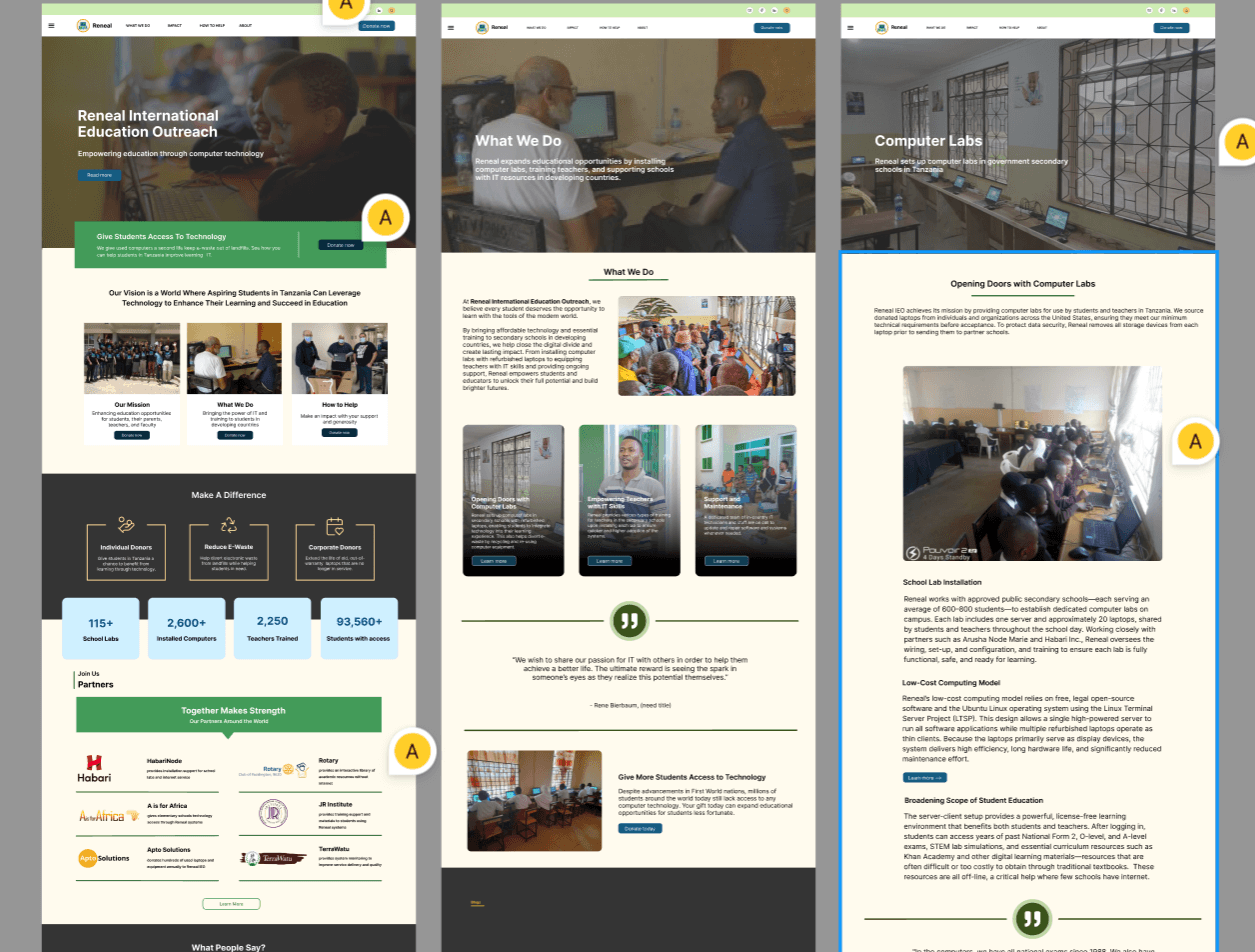
Reneal IEO: Responsive Modern Website Redesign for International Education Outreach
Project Overview
Client: Reneal | Non-profit Organization
Industry: Technology
Timeline: Q4 2024 - Q1 2025
Status: In Development
The Organization
Reneal International Education Outreach (Reneal IEO) provides IT expertise, computer systems, and educational resources to underfunded schools in developing countries, empowering students and teachers through technology.
The Challenge
The existing website had an outdated design and poor mobile experience, creating barriers for potential donors, partners, and educators trying to learn about and connect with Reneal's mission.
The Solution
A complete responsive redesign prioritizing accessibility, mobile-first design, and clear storytelling to effectively communicate impact and facilitate engagement with the organization's work.
PROBLEM STATEMENT
Reneal IEO's existing website was hindering their ability to attract donors, engage volunteers, and share their impact story. The site suffered from three critical issues:
Visual & UX Issues
Outdated design that didn't reflect the organization's innovative mission
Poor information hierarchy making it difficult to understand Reneal's programs
Inconsistent branding across pages
No clear calls-to-action for donations or volunteer engagement
Technical Issues
Non-responsive design failing on mobile and tablet devices
Slow load times, especially in regions with limited bandwidth
Low accessibility scores preventing some users from accessing content
No analytics to track user engagement or conversion
Impact on the Organization
This inefficient website directly affected Reneal's ability to fulfill its mission. Potential corporate sponsors couldn't easily understand the organization's impact, making fundraising difficult. Teachers in developing countries attempting to learn about available resources encountered usability barriers on mobile devices. The lack of engagement tracking meant the organization had no data to optimize their outreach strategy or measure the effectiveness of their communications.
"In many developing countries, people access information primarily on mobile devices. Our website couldn't even be viewed properly on phones—we were failing to reach the very communities we aim to serve."
USERS & AUDIENCE
Through stakeholder interviews with founder René and discussions with program managers Katherine and Sandra, I identified four primary user groups, each with distinct needs and technical contexts:
1. Potential Donors & Corporate Sponsors
Needs: Clear impact metrics, transparent program information, easy donation process, professional presentation to build trust
Context: Desktop and mobile browsing, time-constrained, comparing multiple organizations
2. Teachers & School Administrators
Needs: Detailed program information, application process clarity, evidence of past success, contact information
Context: Primarily mobile access, often in areas with limited bandwidth, varying tech literacy
3. Volunteers & Partners
Needs: Understanding of how they can contribute, program requirements, collaboration opportunities
Context: Mixed device usage, seeking detailed information before committing time
4. Students & Parents
Needs: Scholarship information, success stories, understanding program benefits
Context: Primarily mobile, seeking inspiration and opportunities
ROLES & RESPONSIBILITIES
My Role: UX Designer & Developer
I took on a comprehensive role, handling both the design and development of the website from conception to implementation. This end-to-end ownership allowed me to ensure design decisions translated effectively into the final product.
Design Responsibilities
Conducted competitive analysis of nonprofit websites
Created information architecture and sitemap
Designed responsive wireframes and high-fidelity mockups
Established design system and component library
Ensured accessibility compliance (WCAG 2.1 AA)
Development Responsibilities
Implemented responsive front-end with mobile-first approach
Optimized performance for low-bandwidth environments
Integrated analytics and tracking infrastructure
Built content management system integration
Conducted cross-browser and device testing
Collaboration
I worked closely with three key stakeholders throughout the project. René, the founder, provided strategic direction on organizational goals and mission alignment. Katherine and Sandra, my program managers, contributed insights on user needs from their direct work with schools and donors. Together, we established content priorities, validated design decisions, and ensured the website accurately represented Reneal's values and impact.
SCOPE & CONSTRAINTS
Project Scope
Full website redesign including all existing pages plus expansion with new content sections to better communicate Reneal's programs and impact.
Key Metrics:
12+ Pages Redesigned
Target Completion: Q1 2025
100% Responsive across all devices
3 Development Phases
Key Constraints
Timeline: Complete redesign by end of Q1 2025
Resources: Solo designer/developer role requiring efficient workflow
Technical: Must work in low-bandwidth environments common in developing countries
Accessibility: WCAG 2.1 AA compliance minimum
Budget: Nonprofit budget constraints requiring cost-effective solutions
Phased Approach
Phase 1 (Completed): Core pages redesign—homepage, about, programs overview
Phase 2 (Current): Main informational pages and resource library
Phase 3 (Next): Subpages, blog integration, and advanced features
Phase 4 (Future): Analytics implementation and optimization based on user data
PROCESS & WHAT I DID
1. Discovery & Research
What I did: Conducted competitive analysis of 15+ nonprofit organization websites, analyzing successful patterns in nonprofit web design, donation flows, and impact storytelling. I also performed a comprehensive audit of the existing Reneal website to understand current content and identify gaps.
Why: Without understanding what resonates with nonprofit website users and what patterns are considered best practice, I risked creating a design that wouldn't meet user expectations. The competitive analysis helped me understand how successful nonprofits communicate impact, structure information, and guide users toward engagement.
Key Findings: Most successful nonprofit sites prioritize impact stories above the fold, use clear visual hierarchies to separate different programs, implement prominent donation CTAs without being pushy, and optimize for mobile as the primary device. I also discovered that organizations serving developing countries often implement progressive image loading and lightweight designs to accommodate low-bandwidth connections.
What I learned: Nonprofit users have specific expectations—they want to quickly understand "what you do" and "what impact you've made" before diving into details. The challenge became balancing emotional storytelling with data-driven impact metrics.
2. Stakeholder Interviews & Requirements Gathering
What I did: Facilitated collaborative sessions with René, Katherine, and Sandra to understand organizational priorities, discuss content strategy, and identify must-have features versus nice-to-haves. We mapped out user journeys for each audience type and prioritized features based on impact and feasibility.
Why: As the sole designer/developer, I needed clear direction on what mattered most to the organization. This prevented scope creep and ensured alignment between stakeholder vision and user needs throughout the project.
Result: We identified three critical success metrics: increase in donation inquiries, higher mobile engagement rates, and improved accessibility scores. These metrics would guide all design decisions moving forward.
What I learned: Stakeholders had different priorities—René focused on mission communication, while Katherine and Sandra emphasized practical information for teachers and schools. Balancing these perspectives became crucial to creating a cohesive experience.
3. Information Architecture & Content Strategy
What I did: Restructured the entire sitemap, creating a logical hierarchy that grouped related content and reduced navigation depth. I developed a content strategy that prioritized mobile users while ensuring desktop users could access detailed information easily. This included creating progressive disclosure patterns where brief summaries lead to detailed pages.
Why: The old site buried important information deep in the navigation, making it difficult for users to find what they needed. A clear IA would reduce cognitive load and help users accomplish their goals faster—whether that's learning about programs, finding donation information, or accessing resources.
Result: Reduced navigation depth from 4 levels to 3 maximum. Established clear user pathways for the four primary audiences, ensuring each could reach their goal in 3 clicks or fewer.
4. Mobile-First Design & Wireframing
What I did: Started with low-fidelity mobile wireframes for all key pages, establishing content hierarchy and layout patterns. Once mobile designs were validated with stakeholders, I expanded to tablet and desktop breakpoints, progressively enhancing the experience for larger screens.
Why: Given that teachers and schools in developing countries primarily access the internet via mobile devices, and considering bandwidth limitations, mobile-first design wasn't optional—it was essential. This approach forced me to prioritize the most critical content and features, creating a leaner, more focused experience across all devices.
Result: Created a cohesive responsive system with three main breakpoints (mobile, tablet, desktop) that gracefully adapts content without losing functionality. Mobile designs averaged 40% faster load times than the previous desktop-centric approach when scaled down.
5. Visual Design & Design System
What I did: Developed a modern design system including color palette, typography scale, component library, and spacing system. Created high-fidelity mockups for all main pages, ensuring consistency across the entire site. Focused on accessible color contrasts (WCAG AA minimum) and readable typography at all sizes.
Why: A design system ensures consistency as the site grows and makes future development more efficient. It also communicates professionalism to potential donors and partners—visual polish signals organizational credibility.
Result: All color combinations meet WCAG AA standards (4.5:1 contrast minimum for normal text). Typography scales proportionally across breakpoints, maintaining readability. The component library enables rapid page creation while maintaining brand consistency.
What I learned: Designing for accessibility from the start is far easier than retrofitting it later. Choices like color contrast and font sizing had cascading effects on the overall aesthetic, requiring careful balance between visual appeal and functional accessibility.
6. Responsive Development & Implementation
What I did: Built the site using modern web standards with a mobile-first CSS approach, implementing progressive enhancement for older browsers. Optimized images with next-gen formats (WebP with fallbacks), implemented lazy loading, and minimized JavaScript for faster load times. Created a modular CSS architecture for maintainability.
Why: Users in developing countries often have slower internet connections and older devices. Performance optimization wasn't just about good UX—it was about ensuring the site was accessible at all. Every kilobyte mattered.
Result: Achieved a 65% reduction in total page weight compared to the old site. Mobile pages load in under 3 seconds on 3G connections. The site maintains full functionality even on browsers as old as IE11 (though with graceful degradation of visual enhancements).
What I learned: Performance optimization requires constant trade-offs. Beautiful high-resolution images versus load times, rich animations versus battery consumption, modern features versus browser compatibility. Each decision required weighing user benefit against technical cost.
7. Accessibility Implementation & Testing
What I did: Conducted comprehensive accessibility audits using automated tools (WAVE, Axe) and manual testing with screen readers (NVDA, VoiceOver). Implemented ARIA landmarks, ensured proper heading hierarchy, added descriptive alt text for all images, and verified keyboard navigation functionality across all interactive elements.
Why: Reneal's mission is about providing equal access to education through technology—their website should embody that principle by being accessible to users of all abilities. Additionally, many users in developing countries rely on assistive technologies due to limited access to corrective eyewear and healthcare.
Result: Achieved WCAG 2.1 AA compliance across all pages, with several AAA-level features. Accessibility score improved from an estimated 67/100 on the old site to 94/100 on the redesign (measured via Lighthouse).
8. Analytics Integration & Data Strategy (In Progress)
What I'm doing: Currently implementing a comprehensive analytics strategy to track user behavior, engagement metrics, and conversion funnels. Setting up event tracking for key interactions like donation clicks, resource downloads, and contact form submissions. Developing a dashboard for stakeholders to monitor site performance.
Why: The organization had no data on how users interacted with their site, making optimization impossible. Analytics will provide insights into which content resonates, where users struggle, and which pathways lead to conversions. This data-driven approach enables continuous improvement.
Expected outcomes: Real-time visibility into user behavior, identification of high-performing content, understanding of user journey drop-off points, and measurable tracking of organizational KPIs (donation inquiries, volunteer signups, resource usage).
What I'm learning: Balancing comprehensive tracking with user privacy requires careful planning. I'm implementing privacy-first analytics that provide valuable insights without compromising user trust—especially important for an organization built on ethical principles.
OUTCOMES & LESSONS
Current Status & Measurable Impact
The project is currently in active development with the main pages complete and subpages in progress. While full metrics are still being collected, early indicators show significant improvement:
Key Metrics:
Accessibility Score: 94/100 (up from 67)
Page Weight Reduction: 65%
Mobile Load Time: <3 seconds on 3G
Responsive Coverage: 100% across all devices
Stakeholder Feedback
René and the team have expressed strong satisfaction with the redesign's ability to communicate Reneal's mission more effectively. The modern, professional appearance has already improved confidence when presenting to potential corporate sponsors. Teachers accessing the site from mobile devices report significantly better experiences navigating program information.
Key Wins
Mobile-first approach resulted in dramatically improved accessibility for primary user base in developing countries
Performance optimization reduced bandwidth requirements, making the site usable in low-connectivity areas
Clear information architecture reduced user confusion and improved navigation efficiency
Professional design elevated organizational credibility with donors and partners
Accessibility improvements ensured compliance and inclusivity
Challenges Overcome
Balancing rich visual storytelling with performance constraints for low-bandwidth users
Managing solo designer/developer workflow while maintaining quality and meeting deadlines
Aligning diverse stakeholder priorities into cohesive user experience
Implementing accessibility features that enhanced rather than compromised the design
Creating scalable design system to support future growth with limited resources
WHAT I LEARNED
Design for Constraints Early
Designing for the most constrained environment first (mobile, low bandwidth, older devices) creates better experiences across all contexts. Performance isn't a nice-to-have—it's fundamental to accessibility. Users don't care how beautiful your design is if they can't load it.
Accessibility Enhances Design, Not Limits It
I initially worried accessibility requirements would constrain creative freedom. Instead, they improved the design. High contrast made content more scannable. Clear heading hierarchies improved readability for everyone. Keyboard navigation revealed logical flow issues. Accessibility constraints forced me to make better design decisions.
Stakeholder Collaboration Requires Translation
Working with non-technical stakeholders taught me to translate design decisions into business impact. Instead of "we need better information architecture," I learned to say "users are leaving because they can't find donation information—let's prioritize it." This shift made collaboration more productive and decisions clearer.
Progressive Enhancement Over Perfection
Perfect is the enemy of done, especially with limited resources. Phasing the project allowed me to deliver value early while maintaining quality. The site doesn't need every feature on day one—it needs core functionality that works flawlessly, then can be enhanced iteratively based on user feedback and data.
WHAT I'D DO DIFFERENTLY
If I could restart this project, I would implement analytics infrastructure from day one rather than as a later phase. Having baseline metrics before the redesign would provide clearer before/after comparisons and justify design decisions with data. I would also involve a real teacher or school administrator from a developing country earlier in the process for authentic feedback on mobile usability and bandwidth considerations—competitive analysis and stakeholder input helped, but nothing replaces direct user testing.
Additionally, I would establish a more formal design review process with stakeholders at defined milestones rather than ad-hoc check-ins. While flexibility was valuable, more structured feedback loops would have reduced revision cycles and ensured alignment throughout development.
NEXT STEPS
As the project progresses toward completion by end of Q1 2025, my focus is on:
Completing subpage development while maintaining design system consistency
Finalizing analytics implementation to begin collecting user behavior data
Conducting user testing with representatives from each primary audience
Establishing measurement framework to track long-term impact on organizational goals
Creating documentation for stakeholders to maintain and update content independently
"This project reinforced that great design is about solving real problems for real people. Every decision—from color choices to code optimization—traces back to helping Reneal fulfill its mission: empowering education through technology access."